Free demo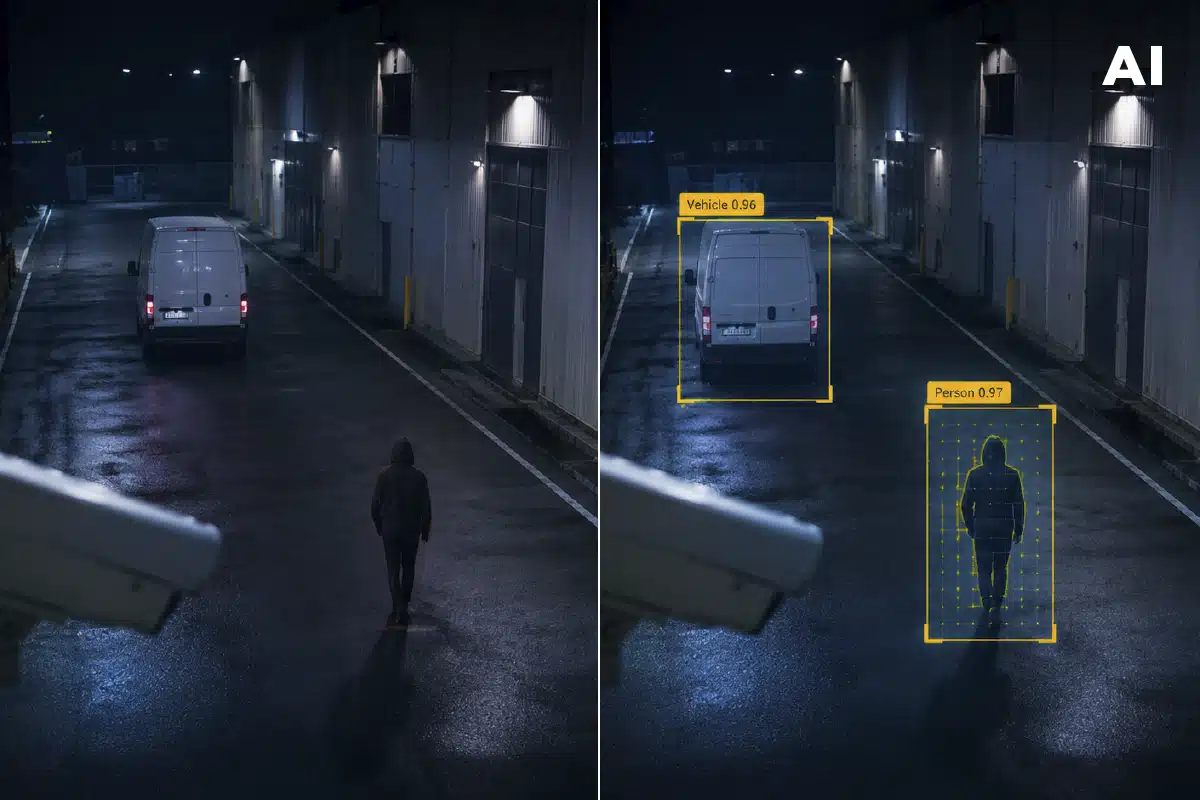
“What if I have to change my entire CCTV system to implement a video analytics solution? How does the integration work?” This is usually what comes to mind when someone proposes adding artificial intelligence to a video surveillance installation that is already set up and running. It’s undoubtedly a legitimate question: replacing a VMS or PSIM in production involves cost, operational risk, and months of migration that nobody wants to take on just to reduce false alarms.
The good news is that, when AI video analytics is properly designed, this question has an easy and definitive answer: there is no need to update or change anything in an already operational CCTV system. AI video analytics does not replace the management infrastructure that already exists and works — it simply adds on top of it, as an intelligence layer that qualifies what the VMS or PSIM is already displaying.
The easiest… and most proactive AI integration
In security, we know that a VMS (Genetec, Milestone, Avigilon, Exacq…) or a PSIM (Advancis, Synectics, Software AG…) is usually the center of an organization’s entire security ecosystem: this is where access policies, response protocols, integration with other corporate systems, and, in many cases, years of configuration and team training reside.
Replacing it with a new platform — even a better one — is not a technical decision, it’s an operational risk decision. That’s why any AI proposal that starts with “first migrate your VMS” usually starts from the wrong approach.
The reality is very different. AI video analytics doesn’t need to replace the existing infrastructure — it enhances it. It integrates easily with the already-deployed VMS or PSIM, adding an intelligence layer capable of detecting, classifying, and prioritizing events in real time without altering routine operations.
The result is a smooth, effective integration that makes the most of already-installed cameras and systems, avoiding infrastructure changes, reducing deployment costs, and allowing value to be delivered from day one.
How AI video analytics really integrates into security
The correct way to frame this is exactly the other way around: AI integrates into your current VMS or PSIM, it doesn’t replace it.
In practice, the detection engine analyzes the video (images) and sends only the already-qualified events to the system your team already uses and knows — classified as people, vehicles, or specific behaviors. Operators keep working from the same interface as always (one they already know and control); the only thing that changes is that the signals they receive now come pre-filtered by AI instead of alarms based solely on motion.
In addition, this makes it possible to add an intelligence layer without modifying the existing infrastructure, without replacing cameras or platforms, and without taking on the costs and risks associated with a migration.
For example, DAVANTIS offers native, documented integrations with the platforms most widely used in the industry, including:
VMS and PSIM: Genetec, Milestone, Avigilon, Exacq, Geutebruck, Network Optix, March Networks, Synectics, Advancis, Cortech, Indra, among others.
Monitoring / alarm receiving center (ARC) platforms: evalink, Bold/Manitou, MKS, Immix, Patriot Systems, CNL, Desico, and more than a dozen additional systems.
Cameras and hardware: compatibility with practically every brand on the market — Axis, Hikvision, Bosch, Hanwha, Dahua, Avigilon, FLIR, and others — via the ONVIF standard, with no need to replace installed cameras.
You can check the full list and integration profiles on the partners page, organized by category: ARC, VMS/PSIM, and cameras.

Don’t replace your CCTV cameras: make them smarter
This is where the big question comes up: “What happens with the CCTV cameras I already have installed?” Simple: AI adapts to your existing cameras.
Integrating an AI video analytics solution isn’t limited to software. It also needs to be compatible with the physical infrastructure already in place, especially the surveillance cameras. If the existing cameras comply with the ONVIF standard — the protocol used by the vast majority of IP camera manufacturers over the last decade — the AI engine can analyze video directly on the existing installation, without replacing a single piece of equipment.
In other words, it’s straightforward to turn a conventional CCTV system into an intelligent video surveillance platform without replacing cameras, cabling, recorders, or other infrastructure elements. Instead of duplicating an investment that’s already been paid off, AI adds a new intelligence layer capable of detecting people, vehicles, intrusions, loitering, abandoned objects, and other relevant events with far greater accuracy than traditional motion detection.
When processing needs to take place within the installation itself — for reasons of latency, cybersecurity, or regulatory compliance — fully local deployment options are also available. In DAVANTIS’s case, the Standalone version is installed on top of the existing infrastructure and processes video on local servers, without depending on the cloud and without modifying the security system already deployed.
Deployment architectures
| Architecture | Where the video is processed | When it makes sense |
|---|---|---|
| Cloud | Cloud servers | Scalability, multiple sites, centralized management |
| Edge | On the device itself | Minimal latency, low network dependency |
| Local / Standalone | Server within the installation | Regulatory compliance, cybersecurity, no cloud dependency |
How to know whether the integration will be compatible with your installation
Before choosing an AI video analytics provider, it’s worth validating a few technical points that will determine the project’s success.
Compatibility with your VMS or PSIM
Check that the provider has a documented integration with the VMS or PSIM you currently use. It’s not enough for a platform to claim it’s “compatible” — there must be a tested, maintained, and officially supported integration. Avoid the generic promise of “compatible with everything.”
Compatibility with existing cameras
Check the protocols the cameras use. If they support ONVIF, they can usually be integrated without difficulty. For devices with proprietary protocols or very old installations, it’s worth validating compatibility beforehand to avoid surprises during deployment.
Deployment architecture
Where do you need the analysis processed — in the cloud, on the device itself (edge), or on a local server? Every organization has different requirements. Some prefer processing video in the cloud to make scaling easier, others need to run the analysis on local servers for privacy or regulatory reasons, while certain projects require processing on the device itself (edge AI). Choosing a provider that offers different architectures provides greater flexibility and makes it easier to adapt the solution to each environment.
Spending a few minutes validating these three points can save weeks of issues and unnecessary costs. The difference between a smooth integration and a problematic project usually comes down to confirming compatibility before starting, not once deployment is already underway.
How to add AI to your CCTV security system without friction
Adding a perimeter AI video analytics solution shouldn’t mean replacing your VMS, changing your PSIM, or renewing your camera fleet.
Technology is what should adapt to the existing infrastructure, making the most of the investment already made and enabling a straightforward transition toward smarter security.
At DAVANTIS, we analyze each installation’s architecture beforehand to validate compatibility with the existing management software, cameras, and hardware. This way, you can know in advance how DFUSION /3 will integrate into your system and what benefits it will bring, without taking on unnecessary risks or making changes to your usual operations.
Want to try DFUSION /3 on your installation? Contact our team to analyze your installation and find out how to integrate AI video analytics into your current infrastructure quickly, easily, and with no obligation.
Frequently asked questions
About integration and compatibility
Do I need to change my CCTV system to implement AI video analytics?
No. AI video analytics is added as an intelligence layer on top of the already-installed VMS or PSIM, without replacing the existing management infrastructure. The system continues to centralize access policies, response protocols, and corporate integrations; the only thing that changes is that the alerts it receives now come filtered and classified by AI instead of being based solely on motion. As a result, this drastically reduces cost and operational risk compared to a full platform migration, which usually involves months of work and retraining operators.
Is DFUSION /3 compatible with my current VMS or PSIM?
DAVANTIS offers native, documented integrations with the leading VMS and PSIM platforms on the market, including Genetec, Milestone, Avigilon, Exacq, Geutebruck, Network Optix, March Networks, Synectics, Advancis, Cortech, and Indra, as well as ARC platforms such as evalink, Bold/Manitou, MKS, Immix, Patriot Systems, CNL, and Desico. What matters isn’t whether a provider claims to be “compatible with everything,” but whether there is a tested, officially supported integration with the specific platform you use.
What happens if my cameras aren’t ONVIF or are very old?
If the cameras comply with the ONVIF standard — the protocol used by the vast majority of IP manufacturers for over a decade (Axis, Hikvision, Bosch, Hanwha, Dahua, Avigilon, FLIR, among others) — the AI engine can analyze the video directly, without replacing any equipment. For installations with proprietary protocols or very old hardware, it’s worth validating compatibility before signing on, to avoid surprises during deployment.
About deployment and operations
Can AI video analytics be processed locally, without depending on the cloud?
Yes. When processing needs to happen within the installation itself for reasons of latency, cybersecurity, or regulatory compliance, fully local deployments are available. DAVANTIS’s Standalone version is installed on top of the existing infrastructure and processes video on local servers, without depending on the cloud.
Cloud and edge architectures are also available, depending on each organization’s scalability or privacy needs.
How do I know if my installation is compatible before signing on?
It’s worth validating three things. One: that there’s a documented, supported integration with your current VMS or PSIM. Two: that the cameras use ONVIF or another compatible protocol. And three: which processing architecture (cloud, edge, or local) fits the project’s requirements. Confirming this before starting avoids weeks of issues during deployment.
Do operators have to learn a new interface?
No. Operators keep working from the same VMS or PSIM interface they already know. The AI engine analyzes the video and sends the system only the already-classified events. This is people, vehicles, specific behaviors, so the change is in the quality of the signal received, not in the tool itself.